

What is HostRepute
HostRepute is an email blacklist monitoring service for teams that send email. You add the domains and IP addresses you send from, HostRepute looks them up on DNS-based blocklists (DNSBLs, the lists mail servers query before they accept or filter mail) around the clock, and it tells you through your alert channels when one of them is listed or removed. Next to blocklists it checks your email authentication records, TLS certificates, uptime and domain registrations, and it reads what Gmail and Outlook.com report about your mail.
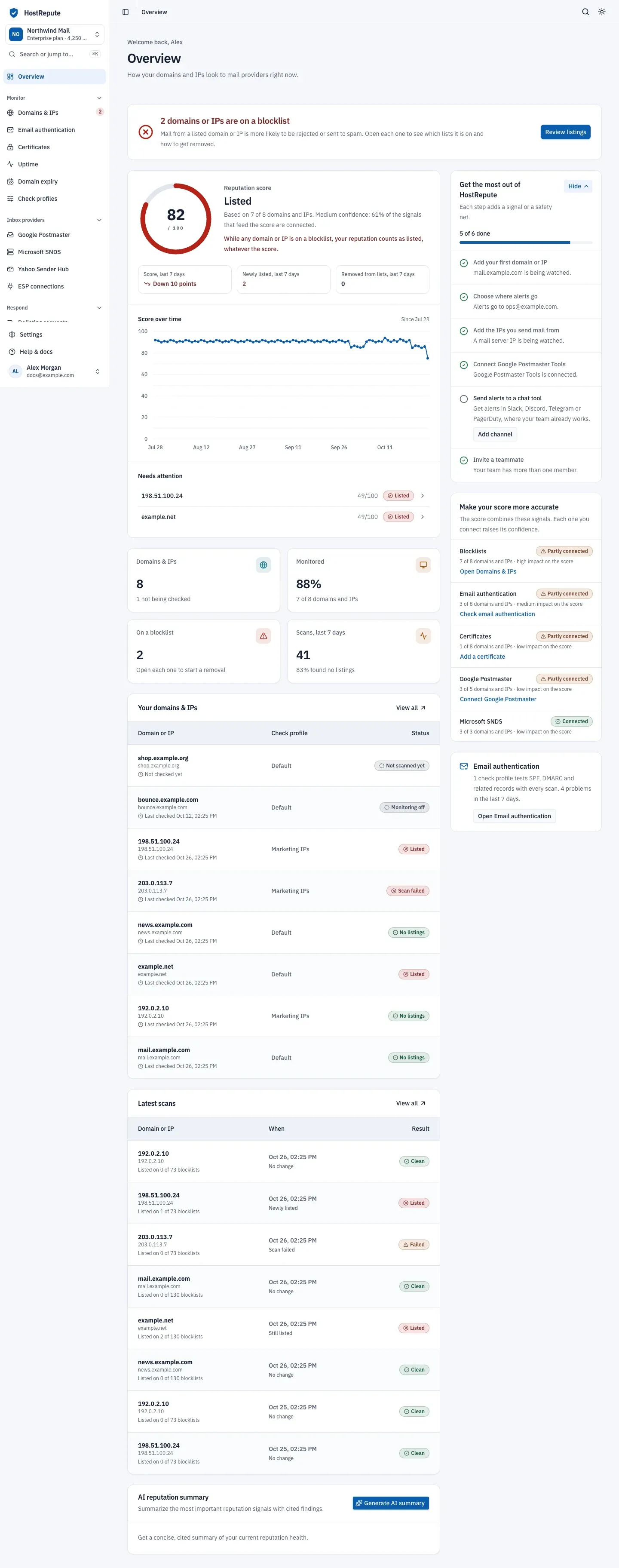
- The reputation score, how it moved over time, and the domains and IPs that need attention.
- Key numbers: your domains and IPs, how many are monitored, how many are on a blocklist, and recent scans.
- The setup checklist, where each step adds a signal or a safety net.
What HostRepute watches
Section titled “What HostRepute watches”The Monitor and Inbox providers sections of the sidebar hold one page for each kind of signal HostRepute watches:
| Sidebar item | What HostRepute checks |
|---|---|
| Domains & IPs | Each domain or IP on the blocklists in its check profile, on a schedule: read Blocklist monitoring. The blocklist reference lists every source. |
| Email authentication | The DNS records mail providers check before they trust your email, such as SPF, DMARC, MX and reverse DNS. Read Check SPF, DMARC and other email authentication and the list of email authentication checks. |
| Certificates | Expiry, trust and revocation of the TLS certificates on your websites and mail servers, over HTTPS, TLS or STARTTLS (SMTP, IMAP, POP3, LDAP and FTP). A private agent checks servers that aren’t reachable from the internet. |
| Uptime | Whether your websites and servers answer, over HTTP(S) or TCP. Read Monitor uptime. |
| Domain expiry | Each domain’s registration expiry date, read from WHOIS every day. Read Get warned before a domain expires. |
| Google Postmaster | What Gmail reports about your domains in Google Postmaster Tools, Google’s reports for senders who mail Gmail users: spam rate, authentication and delivery errors, synced daily. Read Connect Google Postmaster Tools. |
| Microsoft SNDS | What Microsoft’s Smart Network Data Services (SNDS) report about your IPs at Outlook.com and Hotmail: complaint rates, spam-trap hits and blocks, synced daily. Read Connect Microsoft SNDS. |
| Yahoo Sender Hub | A checklist for your Yahoo Sender Hub setup. Yahoo has no public API, so HostRepute can’t read data from it. |
| ESP connections | Sends, bounces and complaints from your email service provider. Mailchimp is the only provider HostRepute connects to today; read Connect your email service provider. |
Scans and the reputation score
Section titled “Scans and the reputation score”A scan looks one domain or IP up on every blocklist in its check profile. Each blocklist either lists it, doesn’t, or doesn’t answer in time. HostRepute scans every monitored domain and IP on a schedule: your plan sets the default and the fastest interval, and Settings, then Team settings, then How often we check changes it for the team, as described in Choose how often we check. Scheduled scans never use credits; a manual scan, run when you need an answer now, costs 1 credit.
A scan that no blocklist answered ends as Scan failed. That is a warning, not a listing: it says nothing about your reputation, and HostRepute tries again at the next scheduled check.
The reputation score turns the signals into one number from 0 to 100, for each domain or IP and for the whole team. It combines blocklists, email authentication, certificates, and Google Postmaster data for domains or Microsoft SNDS data for IPs. While a domain or IP is listed on any blocklist, its own score is capped at 49. Every status label and what it means is in Statuses and what they mean.
Alerts, reports and sharing
Section titled “Alerts, reports and sharing”- Alert channels send an alert when a domain or IP is listed or removed, and when a certificate, uptime check or domain registration changes state. Email, Slack and Telegram work on every plan; Discord, PagerDuty, Pushover and webhooks need the Business or Enterprise plan. Read Set up alert channels.
- Delivery hours decide when each alert channel may deliver, in the timezone you choose.
- Alert activity lists the blocklist alerts HostRepute sent, and Scheduled reports email a daily, weekly or monthly report to the people you choose.
- Status pages show the state of chosen domains and IPs on a page you share by its link, on the Business and Enterprise plans. A scan result can also be shared as a private report link.
Respond to a listing
Section titled “Respond to a listing”The Respond section helps you act on what monitoring finds:
- Delisting requests walks you through each blocklist’s own removal process and tracks where your request stands. HostRepute never submits a removal request for you; you send it, using the steps and links it gives you.
- Manual scan checks a domain or IP right away.
- Campaign preflight checks an email for problems before you send it.
- AI assistant answers questions about your reputation from your own monitoring data, on the Business and Enterprise plans. It is read-only and advisory: it explains and suggests, and you decide what to change.
Teams, plans and the trial
Section titled “Teams, plans and the trial”Everything in HostRepute belongs to a team: its domains and IPs, check profiles, alert channels, members, plan and credits. Signing up creates your first team, named after you, with a check profile called “Default” that includes every free blocklist. You can add more teams with Create a team in the team menu. Each member has one role in a team: Owner, Admin, Manager, Developer or Viewer.
- Trial. A new account gets a 14-day trial with the limits of the Professional plan, and no card is needed. The trial belongs to you, not to a team: every team you own shares it, and a new team doesn’t restart it. Read Plans, trial and billing.
- Paid plans. Professional, Business and Enterprise differ in how many domains, IPs and monitors a team can have, how often it is checked, and which features it includes. Compare them in Plans and limits; prices are on hostrepute.com/pricing.
- Credits. Scheduled monitoring is included in the plan. Checks you start yourself, such as a manual scan, a one-off email authentication check or a campaign preflight, and AI answers use credits. Read Credit costs.
Build on HostRepute
Section titled “Build on HostRepute”Developers can reach the same data outside the portal. Build on HostRepute compares the options:
- A REST API with team API tokens, each limited to the abilities you give it. The API reference lists every operation.
- Signed webhooks for alerts and for finished API checks. The webhook events page lists every event and its payload.
- An MCP server that lets AI clients work with your monitoring data. Its tools, resources and prompts are listed in the reference.
- Prometheus metrics, on the Business and Enterprise plans.
If you only need a one-time answer, HostRepute’s free diagnostic tools work without an account.