

Authentication and API tokens
This page is the reference for API token authentication in the HostRepute API: the team API tokens you create in Settings, then API tokens, how to send them, what each one may do, and the answers you get when a token is refused.
Send the token
Section titled “Send the token”Send the token in the Authorization header of every request, after the word Bearer:
curl "https://app.hostrepute.com/api/v1/hosts" \ -H "Authorization: Bearer $HOSTREPUTE_TOKEN" \ -H "Accept: application/json"- The
Authorizationheader is the only place the API reads a token from. Query parameters and cookies don’t work. - Send the whole token exactly as it was shown, including the number and the
|at its start. - A token works only on
https://app.hostrepute.com/api/v1, and only for the team it was created in.
Team API tokens
Section titled “Team API tokens”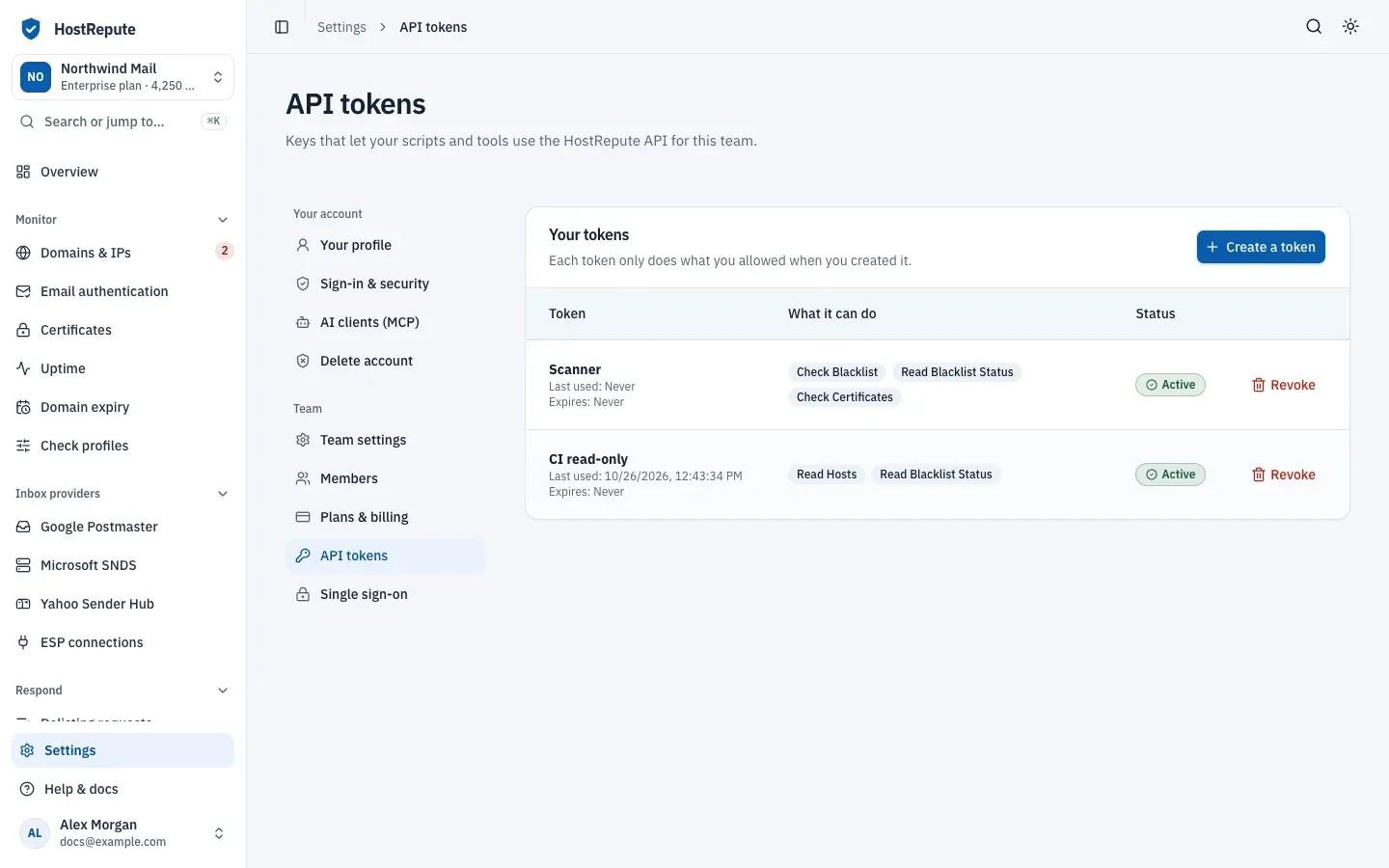
- They belong to the team, not to a person. A token keeps working when the member who created it leaves the team or deletes their account, and the list doesn’t record who created it. Every request it makes counts against the team’s rate limit and uses the team’s credits.
- Who can manage them. Every member of the team can see the list. Creating and revoking tokens needs the Developer role or higher: Owner, Admin, Manager or Developer. See members and roles.
- Shown once. After Create token, the page shows the new token under Copy your new token now. HostRepute stores only a hash of it, so nobody can show it to you again. If you lose it, revoke it and create another.
- Abilities are fixed. A token can do only what you ticked under What it can do when you created it. You can’t change them later: create a new token and revoke the old one.
- Optional expiry. Leave Expires (optional) empty for a token that works until you revoke it, or pick a date and time in the future. HostRepute has no other expiry for API tokens.
- Last used. Each token’s Last used time updates with every request it authenticates.
- Revoking is immediate. Revoke, then Revoke token, stops the token at once. This can’t be undone.
| Setting | Default | How to change |
|---|---|---|
| Token name | 80 characters | Fixed |
| Abilities | At least one | Set per token |
| Expiry date | Optional; must be in the future | Set per token |
The Status column shows one of these:
| Status | Meaning |
|---|---|
| Active | The token works. It has no expiry date, or its expiry date hasn't passed yet. |
| Expired | The token's expiry date has passed, and the API answers 401 to it. It stays in the list until you revoke it. |
Abilities
Section titled “Abilities”Each operation in the API needs one ability. The form in
What it can do groups them by area and starts with every read and check ability ticked.
Read only, Everything except delete,
Full access and Clear change the whole selection, and
the search box finds an ability by name, such as blacklist:check.
| Ability | Name in the portal | API operations it allows | Can be chosen in the portal |
|---|---|---|---|
host:read | Read Hosts | Yes | |
host:create | Create Hosts | Yes | |
host:update | Update Hosts | Yes | |
host:delete | Delete Hosts | Yes | |
data-source:read | Read Data Sources | Yes | |
data-source-group:read | Read Monitoring Profiles | Yes | |
data-source-group:create | Create Monitoring Profiles | Yes | |
data-source-group:update | Update Monitoring Profiles | Yes | |
data-source-group:delete | Delete Monitoring Profiles | Yes | |
alert:read | Read Alert Destinations | Yes | |
alert:create | Create Alert Destinations | Yes | |
alert:update | Update Alert Destinations | Yes | |
alert:delete | Delete Alert Destinations | Yes | |
alert-group:read | Read Contact Groups | Yes | |
alert-group:create | Create Contact Groups | Yes | |
alert-group:update | Update Contact Groups | Yes | |
alert-group:delete | Delete Contact Groups | Yes | |
blacklist:check | Check Blacklist | Yes | |
blacklist:read | Read Blacklist Status | Yes | |
certificate:check | Check Certificates | Yes | |
certificate:read | Read Certificate Status | Yes | |
certificate:agent | Private Certificate Agent | No API operation needs it. | Yes |
deliverability:check | Check Email Deliverability | Yes | |
deliverability:read | Read Email Deliverability | Yes | |
metrics:read | Read Prometheus Metrics | Yes | |
email-verification:check | Check Email Verification | No API operation needs it. | No |
metrics:readalso needs the Business or Enterprise plan; see scrape Prometheus metrics.certificate:agentcan be ticked, but no team API operation uses it. A private agent signs in with its ownhrca_token: see check internal certificates with a private agent.- Ability names use the API’s internal words:
hostis a domain or IP,data-sourcea blocklist,data-source-groupa check profile,alertan alert channel,alert-groupdelivery hours anddeliverabilityemail authentication.
When a token is refused
Section titled “When a token is refused”Unauthenticated (401)
Section titled “Unauthenticated (401)”The token is missing, mistyped, revoked or expired. HostRepute answers before it counts the request against any rate limit.
{ "message": "Unauthenticated." }Not authorized (403)
Section titled “Not authorized (403)”The token is valid but lacks the ability the operation needs. GET /api/v1/metrics also answers this way when the
team’s plan doesn’t include Prometheus metrics.
{ "message": "This action is unauthorized."}The answer doesn’t name the missing ability. Look up the operation in the abilities table or the
API reference, whose pages say “Needs the … ability”. Every error the API returns is listed in
errors.
Other HostRepute credentials
Section titled “Other HostRepute credentials”Team API tokens work only on the REST API. Two other kinds of credentials exist, each for its own endpoints:
| Credential | Created in | Works on | Read |
|---|---|---|---|
| MCP token or OAuth | Settings, then AI clients (MCP), per person | The MCP server, /mcp/hostrepute |
Connect AI clients with MCP |
Agent token hrca_ |
Monitor, then Certificates, per agent | /api/v1/certificate-agent/* only |
Private agents |
Related
Section titled “Related”- Make your first API call walks through creating a token and using it.
- API token abilities is the same abilities table on its own.
- Rate limits explains the per-team request budget.
- Errors lists every error body.