

Monitor TLS certificates
SSL certificate monitoring in HostRepute watches the TLS (Transport Layer Security) certificate on your websites and mail servers: when it expires, whether browsers and mail servers trust it, whether its issuer revoked it, and how well the endpoint is set up. You add each endpoint once under Monitor, then Certificates. HostRepute checks it on a schedule, grades it, and alerts your alert channels when something changes.
Before you begin
Section titled “Before you begin”- Room on your plan. Each certificate you keep checking counts toward your plan’s limit, and the plan sets the fastest check interval. Compare them in Plans and limits; the trial has the limits of the Professional plan.
- The Developer role or higher to add, change, check and delete certificates. Viewers can see every result.
- An endpoint the internet can reach. HostRepute connects from its own servers, to public IP addresses only. For a server inside your network, check internal certificates with a private agent.
- Credits only for checks you start yourself. Scheduled checks are free. Check now uses 1 credit per certificate.
Add a certificate
Section titled “Add a certificate”-
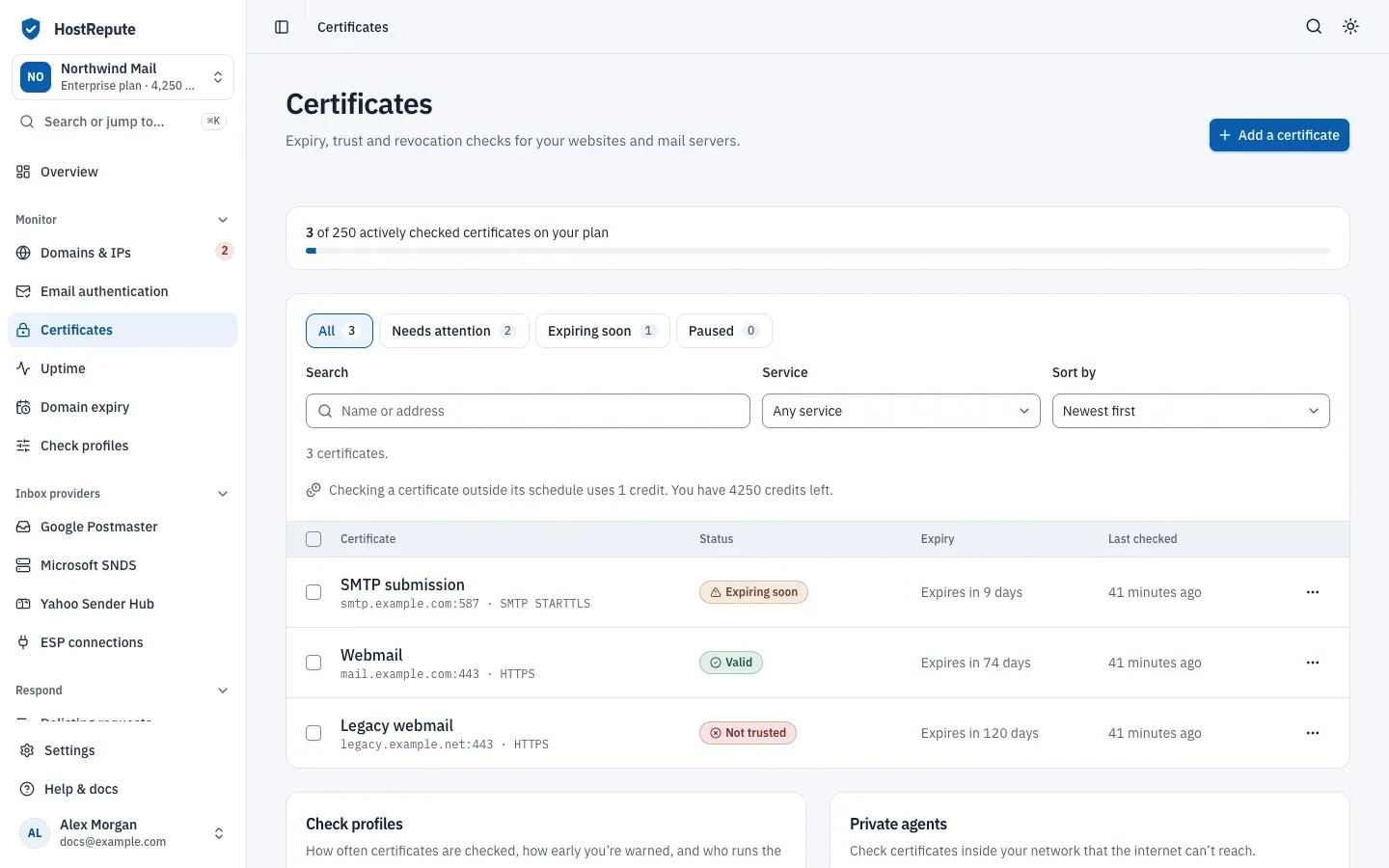
Open Monitor, then Certificates and choose Add a certificate.
-
In Address, enter a domain like
mail.example.comor an IP address. If you paste a URL, HostRepute keeps only the host name and shows which one it will check. -
Pick the Service, which is how the certificate is served. Mail servers use STARTTLS. Each service has a usual port:
Service Default port HTTPS 443 TLS 443 SMTP STARTTLS 25 IMAP STARTTLS 143 POP3 STARTTLS 110 LDAP STARTTLS 389 FTP STARTTLS 21 -
Optionally give it a Name (optional). Alerts show it; it defaults to the address.
-
Leave Start checking it right away on. When your plan’s limit is reached, the switch is off and the certificate is added paused.
-
Open More options when you need them:
- Port (optional), for example
587for mail submission. Empty means the service’s default port. - Server name (SNI), only when the certificate is served under a different name than the address.
- Check profile, which sets how often it’s checked and when you’re warned. New certificates get the profile marked Use for new certificates.
- Port (optional), for example
-
Choose Add certificate. The certificate’s page opens.
Once an hour, HostRepute checks every certificate that is due, so the first check runs within the hour. After that, each certificate is checked as often as its check profile says.
What a check looks at
Section titled “What a check looks at”Each check connects to the endpoint and looks at:
- Expiry: how many days the certificate has left, compared with the warning thresholds of its check profile.
- Trust: whether the chain leads to a certificate authority that browsers and mail servers trust.
- The name: whether the certificate covers the address, or the server name (SNI) you set.
- Revocation: whether the issuer’s certificate revocation list (CRL) includes it. HostRepute reads the CRL only; it doesn’t query OCSP responders. When the list can’t be read or verified, the result is Couldn’t confirm and the next check tries again.
- Key and signature: SHA-256 or stronger signatures, and at least RSA 2048-bit or ECDSA P-256 keys.
- CAA records: whether your domain’s CAA records allow the certificate’s issuer.
- Every server behind the name: with Check every server behind the name on in the check profile, up to 5 of the IP addresses the name resolves to, so a load balancer serving an old certificate doesn’t go unnoticed.
- The TLS setup: old TLS or SSL versions and weak ciphers lower the grade. On HTTPS endpoints, HSTS (Strict-Transport-Security) raises it.
The result is one status:
| Status | Meaning |
|---|---|
| Not checked yet | No check of this certificate has finished yet. HostRepute checks certificates once an hour, so the first check runs within the hour unless it's paused; Check now runs one right away. |
| Valid | The certificate is trusted, covers the name, isn't revoked, has a strong key and signature, is allowed by your CAA records, and isn't close to expiry. |
| Expiring soon | Otherwise valid, but it expires within the largest warning threshold of its check profile (60 days by default). |
| Expired | The expiry date has passed. |
| Not trusted | Still in date, but it fails a trust check: the chain isn't trusted, the name doesn't match, it's revoked, the key or signature is weak, or your CAA records don't allow its issuer. |
| Couldn’t connect | The check couldn't reach the endpoint to look at the certificate. This is a warning about the connection, not a verdict on the certificate. |
| Paused | Checks are turned off for this certificate; it keeps its last result. |
Read a certificate’s page
Section titled “Read a certificate’s page”Select a certificate in the list to open its page. The panel at the top states the result in plain words, for example “Expires in 9 days”, with what to do and when the next check is due.
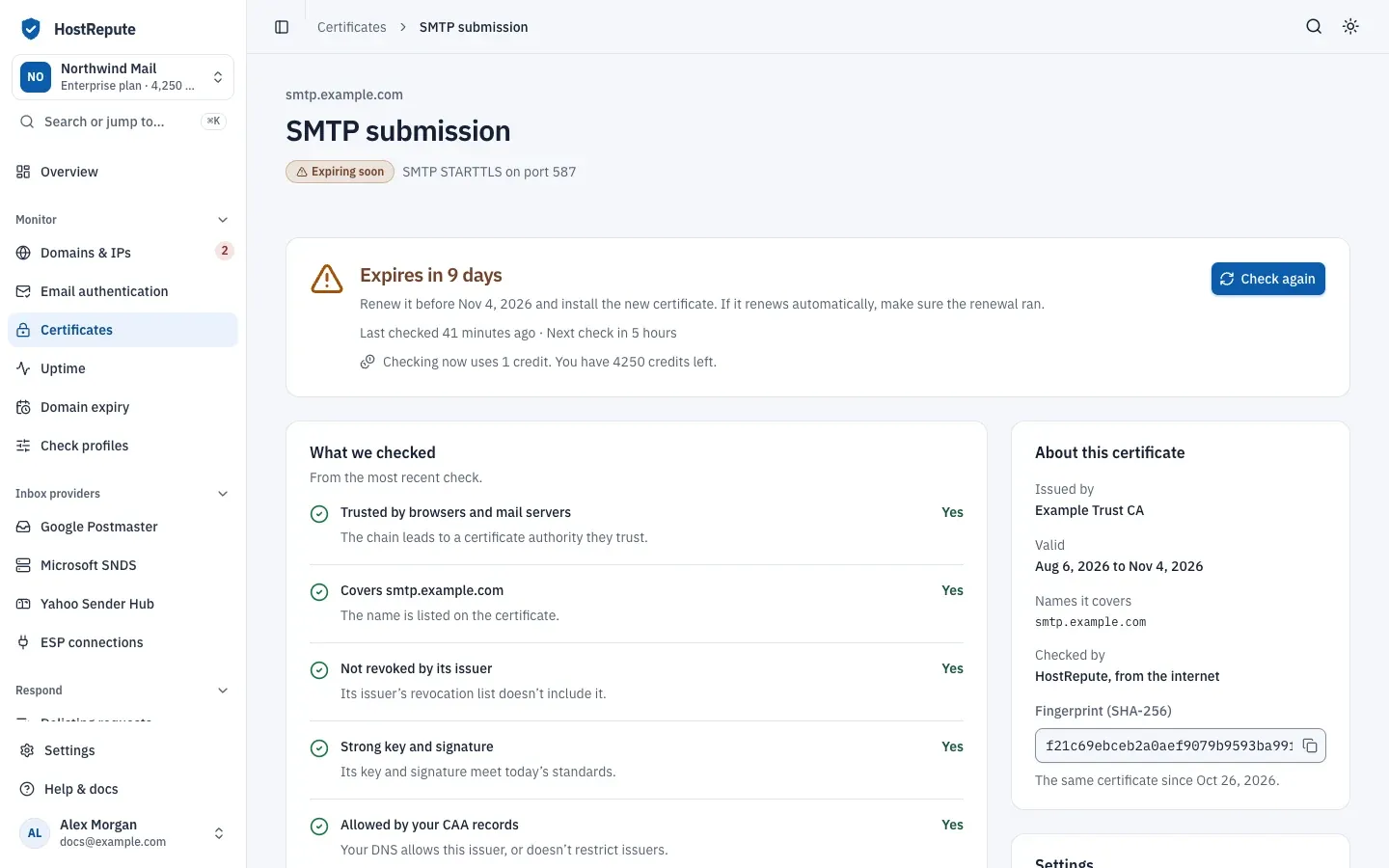
- What we checked lists each check from the most recent run with Yes or No and what it means.
- Security grade shows the grade with its breakdown, and How to improve it lists the fixes that would raise it.
- Servers behind the name shows the result for each IP address behind the name.
- History shows the status over time and Every check.
- Alerts sent lists the alerts this certificate sent.
- Technical details holds the CAA records, the public key and the certificate itself.
- About this certificate shows the issuer, validity, the names it covers, who checked it and its SHA-256 fingerprint.
Security grade
Section titled “Security grade”Each check grades the certificate from A+ to F:
| Status | Meaning |
|---|---|
| A+ | A score of 95 or more with HSTS seen on the endpoint. Each certificate starts at 100 and loses points for near expiry, a weak key or signature, a CAA mismatch, servers that disagree or don't answer, and old TLS versions or ciphers; HSTS adds 3. |
| A | 90 or more (95 or more without HSTS). |
| B | 80 to 89. |
| C | 65 to 79. |
| D | 50 to 64. |
| F | Below 50, or a hard failure: no usable certificate, expired, chain not trusted, name mismatch, or revoked. |
| No grade yet | No check has graded the certificate yet. |
The latest certificate check whose address or server name matches a domain or IP in Domains & IPs also feeds the certificates part of that domain or IP’s reputation score.
Check a certificate now
Section titled “Check a certificate now”To check outside the schedule, choose Check now (or Check again when something is wrong) on the certificate’s page, or Check now in the row’s menu in the list. Each check uses 1 credit, and you can start up to 6 a minute. The page shows Checking now and updates by itself.
A check that ends with Couldn’t connect is still a check, so it keeps its credit. The credit is refunded only when HostRepute can’t run the check at all. To check a certificate from your own scripts, run a certificate check through the API, also for 1 credit.
Choose how often certificates are checked
Section titled “Choose how often certificates are checked”Certificate check profiles live on the Certificates page, under Check profiles. They’re separate from the check profiles for blocklists. Until you create one, the section says No profiles yet. Certificates use a default profile until you create one., and HostRepute creates a profile named “Default” with your first certificate.
-
Under Check profiles, choose Add a profile, or Edit on an existing profile.
-
Fill in the profile:
- Name.
- Check every (hours): from your plan’s fastest interval up to 720 hours (30 days).
- Checked by: HostRepute (from the internet), or a private agent for endpoints inside your network.
- Warn me this many days before expiry: days separated by commas, from 0 to 90, up to 10 of them. The default is 60, 30, 14, 7, 1.
- Alert me when: the events that send an alert. At least one must stay on.
- Check every server behind the name.
- Use for new certificates.
-
Choose Add profile or Save profile.
To move a certificate to another profile, change Check profile under Settings on its page. You can’t delete the default profile, or a profile that certificates still use.
Alerts you get
Section titled “Alerts you get”When a check changes a certificate’s status, reaches the next warning threshold, or reports different events than the
check before, HostRepute alerts every active alert channel, but
only for the events turned on in
Alert me when. The same alert isn’t sent twice on the same day.
Delivery hours apply, and webhook channels receive the alert.certificate_status_changed
event (webhook events). A team without any active alert channel gets these alerts by
email to its Owner.
| Status | Meaning |
|---|---|
| Expiring soon | The certificate expires within the largest warning threshold of its check profile. Choose which events alert you under Alert me when in the certificate check profile. |
| Expired | The expiry date has passed. |
| Valid again | The previous check was expiring soon, expired, not trusted or couldn't connect, and this one is valid. |
| Name doesn’t match | The names on the certificate don't cover the host being checked. |
| Chain not trusted | The certificate chain doesn't lead to a trusted certificate authority. |
| Revoked by its issuer | The revocation check reports that the issuer withdrew the certificate. |
| Couldn’t connect | The connection or TLS handshake to the endpoint, or to one of its resolved IPs, failed. |
| Certificate replaced | The certificate's SHA-256 fingerprint differs from the previous check. |
| CAA records changed | Your CAA records don't authorize the certificate's issuer. Despite the name, it fires on that mismatch, not on every change to the records. |
| Weak signature | The signature algorithm or key strength is below modern thresholds: SHA-256 or stronger signatures, at least RSA 2048-bit or ECDSA P-256 keys. |
| Servers show different certificates | The host's resolved IPs served different certificates. It needs a check profile that checks every resolved IP. |
Expiring soon first fires at the largest threshold, then again at each smaller one, so with the defaults you’re warned 60, 30, 14, 7 and 1 days before expiry.
Pause, resume or delete certificates
Section titled “Pause, resume or delete certificates”- One certificate: in the row’s menu, choose Pause checks, Resume checks or Delete. On its page, the Keep checking it switch does the same as pause and resume.
- Several at once: tick them, or use Select all on this page, then choose Check now, Pause, Resume or Delete. A bulk check needs enough credits for every selected certificate that isn’t paused. Resume turns on only as many as your plan has room for.
A paused certificate keeps its last result. Deleting a certificate stops its checks and deletes its check history for good.
Defaults and limits
Section titled “Defaults and limits”| Setting | Default | How to change |
|---|---|---|
| Monitor name | 255 characters | Fixed |
| Host | 255 characters | Fixed |
| Port | 1 to 65535 | Fixed |
| SNI hostname | 255 characters | Fixed |
| Monitors per bulk action | 50 monitors | Fixed |
| Certificate profile name | 80 characters | Fixed |
| Check interval | Up to 720 hours (30 days) | Set per certificate profile; the shortest interval depends on your plan |
| Warning thresholds | 1 to 10 thresholds | Set per certificate profile |
| Warning threshold | 0 to 90 days before expiry | Set per certificate profile |
| Default warning thresholds | 60, 30, 14, 7 and 1 days before expiry | Set per certificate profile |
| Alert events | At least one event turned on | Set per certificate profile |
| Certificate agent name | 80 characters | Fixed |
Check that it worked
Section titled “Check that it worked”- The list shows the certificate’s status, expiry and when it was last checked.
- Its page says when it was last checked and when the next check is due.
- When something changes, the alert appears under Alerts sent and on your alert channels.
Troubleshooting
Section titled “Troubleshooting”- Couldn’t connect, with “No public IP addresses could be resolved for this host.” The name points only to private addresses, which HostRepute can’t reach. Use a private agent.
- Couldn’t connect on a public endpoint. Check the address, the port and the service, and that the server accepts connections from the internet. Mail servers usually need SMTP STARTTLS on port 25 or 587.
- Name doesn’t match. The certificate doesn’t list the name being checked. If the server presents the certificate under another name, set Server name (SNI); otherwise get a certificate that lists this name.
- Chain not trusted. The chain is incomplete or self-signed. Install the intermediate certificates from your provider.
- Servers show different certificates. The IP addresses behind the name serve different certificates. Deploy the same certificate on every server.
- “Your current plan cannot monitor more certificates.” You reached the plan’s limit. Pause or delete another certificate, or change your plan.
- Check now is greyed out. The team doesn’t have enough credits; the notice next to it says so. A paused certificate shows Resume checks instead.
- Still Not checked yet. It’s paused, or the hourly pass hasn’t run yet.
- The list says Nothing matches these filters. Choose Clear filters.
- A profile can’t be deleted. It’s the default profile, or certificates still use it. Move them to another profile first.